An evidence management software evaluation often focuses on features and cost. Those factors matter. But one of the key criteria agencies miss is how long the switch will take.
How long it takes to move to a new system directly affects your staff, your workflows, and your risk. Knowing the timeline during the evaluation helps agencies avoid costly surprises after the contract is signed.
So what should you expect?
Why Migration Timeline Belongs in Your Evidence Management Software Evaluation
Most agencies start an evidence management software evaluation with a feature list. They ask about storage, security, mobile evidence collection, chain-of-custody tracking, and sharing evidence with prosecutors. All of that is needed.
What fewer agencies ask is this: how does your process actually work, and how long does it take?
A vendor who cannot answer that question clearly is giving you useful data. A vendor who handles the move well looks very different from one who does not, and your agency deals with the results either way.
Build a timeline into your vendor scoring. Ask for a sample project plan. Ask for references from agencies that went live recently. Ask whether timelines came in on target and what caused delays. Those answers tell you more than any demo will.
What to Expect During an Evidence Management Software Evaluation and Migration
Many agencies assume switching evidence management software takes six months or more. In practice, a smooth deployment can take as little as four to eight weeks from signing to go-live.
That timeline can grow when moving data from another platform. That process adds steps and extra coordination. Expect up to a couple of months in those cases. But compared to what most agencies assume, it is still faster than many expect.
During an evidence management software evaluation, this timeline is what you are truly assessing, not just how long it takes, but how well each step is handled by the vendor.
Here is what the process looks like.
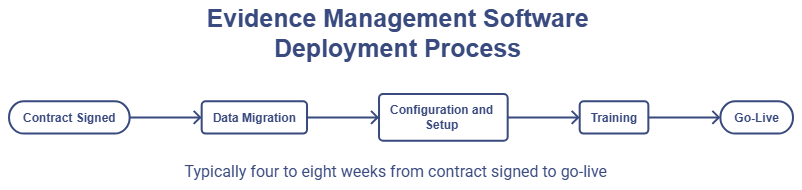
Data Migration
If your agency is bringing data from a prior system, that happens first. File size and data type affect the timeline more than anything else. Agencies with large forensic data sets, full hard drive images, or phone extractions should ask their vendor how they handle large file storage before signing.
Standard cloud platforms were not built for forensic evidence data. Storage built for this work handles these file types without the issues you find on general platforms.
Configuration and Setup
Once data migration wraps up, the system gets set up to match your agency’s workflows. That includes user roles, access levels, and case types. Some of this happens near the end of migration, and some happens at cutover. Your vendor should walk you through what gets done when and who owns each step.
This is also when tools specific to your agency get turned on. For example, agencies that collect citizen evidence would confirm that Witness Upload sends submissions to an unassigned queue for officer review rather than directly into a case file. Getting this right before go-live prevents issues on day one.
Training
Agencies get access to an on-demand video library that walks users through the system at their own pace. That resource is available whenever your team is ready, before go-live, at cutover, or after. If your agency wants a live walkthrough, it’s available upon request.
Who needs what training matters here. Evidence custodians need different guidance than patrol officers uploading files from the field. IT staff need system-level guidance separate from end users. The on-demand format lets each person work through what is relevant to their role.
Go-Live
Agencies pick a go-live date and do a cutover. There is no long overlap period where both systems run at once. A clean cutover keeps things simple and gets your team working in the new system fast.
Plan a check-in shortly after go-live to handle any questions that come up in real use.
Evaluation Red Flags: What to Watch for When Assessing Any Vendor
During your software evaluation process, watch for vendor responses that signal risk.
Vague project plans. If a vendor cannot clearly explain their process and timeline during the sales cycle, that is a red flag. Vendors who have done this before can walk you through exactly what happens and when.
No recent references. Ask for agencies that went live in the past year. If a vendor stalls or only offers old references, dig deeper.
Unclear data migration process. Ask how data moves from your current system into the new one. Who handles it? What happens to file types that do not move cleanly? You want a clear answer, not a vague promise.
Staff gaps. Your evidence custodian and IT lead will need to be available during the move. Agencies that underestimate this run into delays.
Slow response times during sales. How a vendor responds during the sales cycle tends to reflect how they act during and after the move. Pay attention to that early.
What Speeds Up an Evidence Management Software Implementation
Agencies that move fast through the software evaluation process and into deployment share a few traits. They assign one internal point of contact who owns the process from contract to go-live. They make setup decisions fast rather than going over the same questions in multiple meetings. And they get the right people involved early, so nothing stalls waiting on approvals.
Frequently Asked Questions About Evidence Management Software Evaluation and Migration
What should be included in an evidence management software evaluation?
A solid evaluation covers storage, chain of custody tracking, evidence authentication, mobile evidence collection, citizen evidence submission, sharing with prosecutors, large forensic file support, user access controls, audit trails, and vendor support during deployment. For a structured way to work through those criteria, download the VeriPic Evidence Management Software Evaluation Scorecard.
How does the migration timeline affect vendor selection during an evidence management software evaluation?
Timeline signals how mature a vendor’s process is. A vendor with a clear plan and recent references shows they know what they are doing. One who cannot outline the process during the sales cycle is a risk.
What should we ask vendors during the evidence management software evaluation process?
Ask how their process works and how long it takes. Ask for references from agencies that went live recently. Ask how they handle data from a prior system. Ask what has caused delays before and how they handled it.
Will officers lose access to evidence during migration?
A well-run deployment keeps active cases accessible. Ask your vendor to walk you through exactly how the cutover works and what your team can reach during that window.
What happens to the chain of custody records during migration?
Chain of custody logs should move with each record. Confirm this with your vendor before migration starts, and ask how they check it.
What if we have very large forensic files?
Large forensic data sets, including full hard drive images and phone extractions, need storage built for that purpose. Standard cloud platforms are not designed for this. Confirm your vendor’s approach before signing.
How do we know a quoted timeline is realistic?
Ask for references from agencies that went live recently. Ask whether the timeline came in on target and what caused any delays. That is more reliable than any estimate from the sales process.