Body cameras, dash cams, surveillance footage, crime scene photos, digital forensics, today’s law enforcement generates more digital evidence in a month than agencies collected in entire years just a decade ago. But many departments are still managing this evidence the same way they handled paper files in the 1990s: with a loose collection of hard drives, burned DVDs, and shared network folders.
Here are five clear signs it’s time to move to a purpose-built digital evidence management system.
1. Evidence Gets Lost (Or Takes Hours to Find)
It’s 2 PM on a Friday. The prosecutor’s office calls requesting dash cam footage from a traffic stop three months ago. You know it exists. An officer definitely recorded it. But where is it now?
Cue the scramble: checking three different shared drives, an external hard drive someone borrowed, old email attachments, and maybe a DVD buried in a file cabinet somewhere. Two hours later, you’re still looking, or worse, you can’t find it at all.
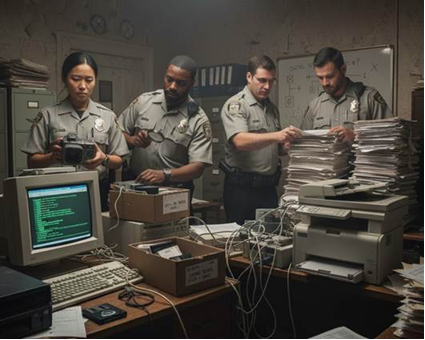
The hidden cost: It’s not just wasted time. Evidence that can’t be located when needed weakens cases, frustrates prosecutors, and creates serious liability. If you can’t produce evidence because your filing system is “Officer Johnson’s laptop” or “the E: drive, I think,” you have a problem that’s only getting worse as evidence volume grows.
2. You Can’t Prove Who Accessed or Modified Evidence
A defense attorney asks a simple question: “Can you verify that this video hasn’t been altered since it was recorded?”
If your evidence lives on shared drives where anyone with access can view, copy, edit, or delete files, and there’s no automatic log of who did what, your answer is probably “no.” That’s a chain of custody nightmare.
Why it matters: Courts increasingly scrutinize digital evidence. Without a complete audit trail showing every person who accessed a file and every action they took, even legitimate evidence can be challenged or excluded. One successful challenge can set a precedent that weakens future cases.
A proper digital evidence management system automatically logs everything: uploads, views, downloads, shares, and any modifications. It’s not just best practice, it’s often the difference between admissible evidence and a dismissed case.
Learn more: Inside the Digital Chain of Custody
3. Public Records Requests Are Overwhelming Your Staff
Ten years ago, your agency might have received a handful of public records requests per year. Today, it’s dozens or hundreds, and body cam footage tops the list.
If fulfilling one video request requires a staff member to:
- Spend hours locating the right footage across multiple storage locations
- Export it to separate software for redaction
- Manually blur faces and license plates frame-by-frame for 6-8 hours
- Burn it to a DVD or upload it somewhere to share
…you’re spending thousands in staff time per request. Multiply that by every request you receive, and the cost becomes staggering.
What changes with a DEM: Purpose-built systems centralize evidence (no more hunting), often include integrated redaction tools or services, and provide secure sharing links instead of physical media. Agencies report cutting public records response time from weeks to days, and slashing labor costs by 60-70%.
Avoid common pitfalls: 5 Common Discovery Mistakes and How to Avoid Them
4. Storage Is Out of Control (And Expensive)
Your IT department keeps buying more hard drives. Your server room is full. Your budget for storage infrastructure keeps climbing. Officers are getting “storage full” warnings and, worst case scenario, some are deleting old footage to make room for new recordings.
If you’re deleting potential evidence due to storage constraints, that’s massive liability. If you’re constantly expanding on-premise infrastructure, that’s expensive and never-ending.
The volume problem: A single agency with 50 officers wearing body cameras can generate 10-20 terabytes of video per year. Add dash cams, interview room cameras, surveillance systems, crime scene documentation, and digital forensics, and you’re looking at exponential growth with no end in sight.
Modern digital evidence management systems are designed for this reality. They include retention policies that automatically archive or delete evidence according to your agency’s rules, compression that reduces file sizes without quality loss, and cloud integration options for virtually unlimited capacity without constant capital expenses.
5. Sharing Evidence Creates Security Risks
How do you currently share evidence with prosecutors? Other agencies? Internal departments?
If the answer involves burned DVDs sent through the mail, file transfer services, email attachments, or thumb drives, every transfer is a security risk and a potential chain of custody gap.
Real scenarios that happen regularly:
- DVD lost in transit to prosecutor’s office
- File transfer link accidentally sent to wrong email address
- Prosecutor forwards raw, unredacted footage to defense without thinking
- No record of who actually viewed or downloaded the evidence
A proper system provides secure, time-limited sharing with complete control. You can grant specific people access to specific evidence for specific timeframes. Everything is logged. Recipients can view but can’t modify, download without permission, or redistribute. You maintain control, and your chain of custody stays intact.
Read more: The True Cost of Thumb Drives and CDs for Evidence Sharing
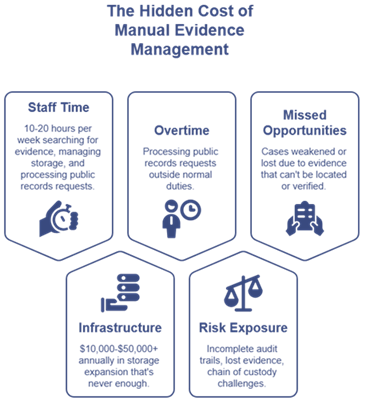
What It Actually Costs to Do Nothing
Most agencies don’t calculate the true cost of their current “system”:
- Staff time: 10-20 hours per week searching for evidence, managing storage, and processing public records requests
- Infrastructure: $10,000-$50,000+ annually in storage expansion that’s never enough
- Overtime: Processing public records requests outside normal duties
- Risk exposure: Incomplete audit trails, lost evidence, chain of custody challenges
- Missed opportunities: Cases weakened or lost due to evidence that can’t be located or verified

Purpose-built digital evidence management systems aren’t just about organization, they’re about reducing costs, minimizing risk, and ensuring the evidence your officers collect actually makes it to court intact and admissible.
Is Your Agency Ready?
Not every agency needs the most expensive, feature-packed system on the market. But if even two or three of these scenarios sound familiar, it’s worth understanding what’s available and what other agencies your size are using successfully.
New to digital evidence management? Start here: What Is a Digital Evidence Management System (DEMS)?