Digital evidence is at the center of nearly every case your agency handles. That system deserves the same scrutiny as any other critical infrastructure decision.
Yet evaluation often gets delayed. A contract renewal forces the conversation, a storage ceiling gets hit, or a court challenge puts evidence handling practices under a microscope. By then, the window for a careful, structured evaluation has already narrowed.
This guide is for agencies that want to get ahead of it. You may be approaching a contract renewal, dealing with a system that no longer fits your needs, or building a case for leadership to make a change. A structured evaluation process gives you the clarity to choose the right tool. Not just the most familiar one. Agencies re-evaluating after years on the same platform face the same core challenge. They need to know what to look for before the sales process starts.
Have questions about evaluating your current system? Talk to VeriPic’s Team
Quick Answer: When evaluating evidence management software, agencies should prioritize chain of custody controls, storage scalability, usability, security, vendor support, total cost of ownership, and real-world pilot testing with a team that spans departments.
What Is Evidence Management Software?
Evidence management software is also called a digital evidence management system or DEMS. It gives law enforcement agencies a centralized platform to store, manage, and share digital evidence. That includes body-worn camera footage, crime scene photos, audio recordings, forensic files, and surveillance video.
A modern DEMS does more than store files. It tracks every interaction with every piece of evidence and controls who can access what. It also produces the documentation courts require to admit digital evidence.
Key Features of Evidence Management Software
Not every platform marketed as evidence management software delivers the same capabilities. Before evaluating vendors, understand what a modern system should include.
Core capabilities to look for:
- Chain of custody tracking. Every interaction with every piece of evidence is logged, timestamped, and tamper-evident.
- Secure, scalable storage. The platform handles growing evidence volumes. That includes large forensic data sets that need long-term retention.
- Role-based access controls. Evidence visibility is limited by role or case assignment, not login credentials alone.
- Search and retrieval. Investigators can find evidence using flexible search parameters across cases and file types.
- Redaction tools. Sensitive content can be protected before evidence is shared externally. Redaction actions are logged in the audit trail.
- Citizen evidence submission. Members of the public can submit digital evidence through a structured portal. Chain of custody is maintained from the first receipt.
- Forensic image tools. Latent print examiners and forensic analysts have dedicated tools for image enhancement and authentication. These tools do not disrupt the chain of custody.
- Discovery and sharing. Evidence can be compiled and shared with prosecutors, attorneys, and other agencies. The format holds up in court.
Platforms that cover all of these capabilities give agencies a single, unified system for the full evidence lifecycle, from intake through court.
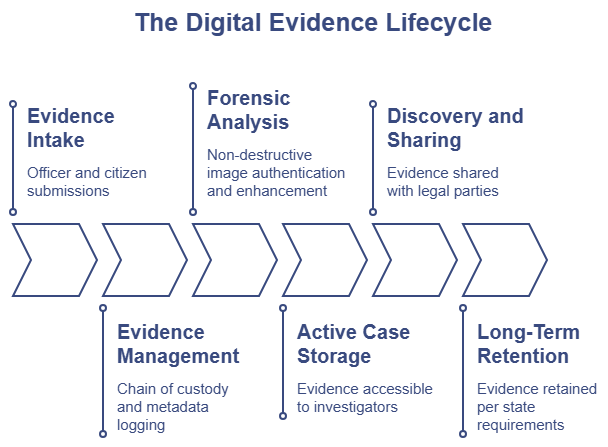
The State of Digital Evidence in Law Enforcement
Digital evidence volume is growing fast. Body-worn cameras are now standard equipment at agencies of every size. In-car video, surveillance footage, drone video, and smartphone recordings add to the load daily.
Prosecutors expect organized, searchable, and digital evidence packages that hold up to review. Courts expect a documented chain of custody at every step. Defense attorneys look for gaps.
AI-generated media adds a new layer of complexity. Once a digital image enters the evidence record, its authenticity can be challenged in court. Investigators need tools to test whether an image is AI-generated or manipulated. That protects integrity before an attorney raises the question. It also prevents acting on evidence that turns out to be fake.
Agencies running legacy systems built before these challenges existed are feeling the pressure. The stakes have changed. The software needs to change with them.
Why a Structured Evidence Management Software Evaluation Matters
Before you look at a single vendor, get clear on what’s driving the conversation. Your trigger shapes your criteria. An agency struggling with storage has different priorities than one dealing with recent audit findings.
Common triggers include:
- The video problem. Body-worn camera footage, in-car video, and surveillance footage are overwhelming legacy storage limits.
- Audit red flags. Internal or external audits expose gaps in the chain of custody documentation.
- Institutional knowledge loss. High staff turnover reveals how dependent the agency was on one person’s familiarity with the old system.
- Legal scrutiny. Court challenges put your digital evidence handling practices under a microscope.
Know your primary pain point early. Use it to weight your scoring when you evaluate vendors.
Step 1: Build Your Cross-Functional Evaluation Team
Evidence management software touches nearly every part of an agency. If only IT evaluates it, you’ll get a technically sound system that officers refuse to use. If only evidence custodians evaluate it, you may miss requirements that surface during investigations or court proceedings.
A solid evaluation team brings multiple perspectives to the table.
| Stakeholder | What They Care About Most |
|---|---|
| Evidence Custodians | Intake efficiency, inventory control, and disposition workflows |
| IT Leadership | Security, cloud architecture, and system performance |
| Patrol Supervisors | Quick, intuitive evidence submission at the end of a shift |
| Investigators & Detectives | Fast search and retrieval, case organization, and cross-referencing |
| Forensic Analysts | Image enhancement, authentication tools, and forensic workflow support |
| Legal Counsel / Prosecutor | Defensible chain of custody and straightforward discovery exports |
Get everyone involved before you start scoring vendors.
Step 2: Define Your Digital Evidence Management System Requirements
Some requirements are preferences. Others are requirements in the legal sense of the word. Know the difference before you talk to vendors.
Core requirements for a modern evidence management system include:
- A complete, tamper-evident audit trail for every piece of evidence
- Compliance with state retention laws
- Chain of custody documentation that holds up in court
- Role-based access controls that limit evidence visibility by role or case assignment
- Scalable storage that grows with your evidence volume
- A way for citizens to submit digital evidence directly to the system
- Redaction capabilities for protecting sensitive information in shared evidence
- Tools for forensic image enhancement and authentication
On cloud vs. on-premise: treat this as a setup question, not a preference. Evaluate your actual IT capacity and long-term operational needs. VeriPic’s Digital Evidence Manager offers scalable storage and remote access. It removes the hardware burden of maintaining your own servers. That matters for agencies with limited internal IT resources.
Step 3: Understand Your Long-Term Storage Needs
Video evidence has changed the storage math for agencies of every size. But storage is not only about capacity for active cases. It is also about what happens after a case closes.
Homicide cases generate large volumes of digital evidence. Once the case closes, that evidence often requires long-term or permanent retention. Full forensic hard drive images and cell phone extractions need purpose-built storage. General cloud platforms were not built for this.
Purpose-built solutions like VeriPic Drive address this need directly. VeriPic Drive is designed for long-term storage of large forensic data sets. It gives agencies a secure, scalable repository for evidence retained well beyond case closure.
When you interview vendors, ask:
- How does your platform handle long-term retention of large forensic data sets?
- What are the file size limits for uploads?
- What happens to storage costs as retention requirements extend?
- How is data protected and recoverable over long retention periods?
Storage architecture should be a primary evaluation criterion, not an afterthought.
Step 4: Evaluate Security and Chain of Custody Controls
Chain of custody is the backbone of evidence management. Your software either protects it or it doesn’t.
Any vendor that can’t show court-ready, tamper-evident controls should be removed from your list early. Look for:
- Immutable audit logs. Every access, export, modification, and deletion is captured, timestamped, and protected from alteration.
- Role-based access controls. Permissions are structured by role or case assignment, not login credentials alone.
- Non-destructive editing. Forensic enhancement tools must work on copies or working files, never the original master file. The integrity of the original evidence is preserved throughout the analysis process.
- In-file image authentication. Investigators can test image authenticity from within the case file. The test runs before the photo enters the official evidence record.
- Forensic image enhancement tools. Latent print examiners and forensic analysts have dedicated tools for working with digital evidence. These tools do not disrupt the chain of custody.
VeriPic’s Detect-a-Fake integrates image authentication directly within the case file. VeriPic’s Digital Forensic Suite gives forensic analysts dedicated enhancement tools. They support the full forensic workflow without altering the original master file.
Step 5: Evaluate Citizen Evidence Submission
Agencies rely on digital evidence submitted by the public. Witnesses submit photos and videos from smartphones. Community members share surveillance footage. That evidence needs a structured, trackable path into the system.
Look for platforms that include a dedicated citizen evidence submission tool. Key questions to ask:
- Can citizens submit evidence without creating an account or downloading an app?
- Does the submission process maintain the chain of custody from the moment evidence is received?
- Can submissions be anonymous?
- How does submitted evidence get routed to the right case or investigator?
VeriPic’s Witness Upload gives agencies a structured way to receive digital evidence from the public. Chain of custody is maintained from the first submission.
Step 6: Test Usability With Real Workflows
A system that works in a controlled demo may fall apart in the field. The real test is whether an officer at the end of a shift can submit evidence correctly and without calling the evidence room for help.
When you request a demo, don’t let the vendor drive the script. Bring your own scenarios and run this sequence:
- Evidence submission test. Have an officer submit a batch of digital evidence. Watch how the system handles the intake process, metadata, and routing.
- Investigator test. Have a detective search for a case using limited parameters, group the files, and link them to a mock report.
- Redaction test. Have a staff member apply redactions to sensitive content before sharing it externally.
- Discovery export test. Compile and export evidence for a discovery request. Note how straightforward and defensible the process is.
Also evaluate training burden. How long does it take a new employee to reach competency? Agencies with high turnover need a system with a short learning curve.
Step 7: Ask Hard Questions About Vendor Support
The software is only part of the commitment. The vendor relationship matters too.
Ask every vendor the same questions:
- What does data migration from our legacy system look like, and who manages it?
- What is the implementation timeline?
- What does support look like after go-live?
- Do we get a dedicated account rep or a shared ticket queue?
Ask for references from agencies of similar size and evidence volume. Then call them. Ask about implementation, not the sales process.
Step 8: Calculate Total Cost of Ownership
License fees are visible. A lot of other costs aren’t. Build a full three-year cost model before you compare vendors on price.
Factor in:
- Migration costs. What does it cost to move your legacy data into the new system?
- Scaling costs. How does pricing change as your agency grows or adds divisions?
- Per-user or per-GB pricing. Understand how costs change as headcount and storage volume increase.
- Long-term retention costs. Factor in storage costs for evidence that requires extended retention after case closure.
- Training time. Every hour staff spend learning a new system is an hour not spent on other work.
A system with a long ramp-up time isn’t free because training is included in the contract.
Step 9: Run a Structured Pilot
Don’t sign a multi-year contract based on demos and reference calls alone. Request a structured pilot with your actual data and your actual workflows.
Before the pilot begins, define what success looks like. Test these specific workflows:
- Evidence submission from officers in the field
- Citizen evidence submission through a public-facing portal
- Search and retrieval by investigators
- Redaction of sensitive content before external sharing
- Audit log review
- Sharing evidence with attorneys, prosecutors, or other agencies
Involve end users in the pilot, not IT alone. The people who use the system daily are the most reliable judges of whether it fits the work.
How to Compare Evidence Management Software Vendors
Use this law enforcement evidence software comparison framework after demos and pilot testing to score vendors across your team.
| Evaluation Area | Questions to Ask | Why It Matters |
|---|---|---|
| Chain of Custody | How are audit logs protected? Can they be altered? | Tamper-evident records are required for court admissibility |
| Storage and Retention | Are there file size limits? How is long-term retention priced? | Forensic data sets need storage built for extended retention |
| Security | How are role-based permissions structured? | Access controls protect evidence integrity and limit liability |
| Usability | How long does it take a new officer to submit evidence? | High turnover agencies need short learning curves |
| Citizen Submission | Can citizens submit evidence without an account or app? | Public evidence needs a structured, trackable intake path |
| Redaction | What redaction tools are included? | Sensitive content must be protected before external sharing |
| Forensic Tools | Do forensic tools preserve the original master file? | Non-destructive analysis is required for chain of custody integrity |
| Migration | Who manages the migration? How is data integrity verified? | Migration failures put years of evidence at risk |
| Support | Is there a dedicated rep after go-live? | Long-term success depends on the vendor relationship |
| Total Cost | What are the full three-year costs? | License fees are only part of the budget picture |
Score each vendor across your stakeholder group before comparing results. Disagreements in scoring often reveal unspoken priorities worth resolving before you decide.
Common Mistakes Agencies Make During a DEMS Evaluation
Even experienced agencies make avoidable mistakes during an evidence management software evaluation. Watch for these:
Focusing only on storage costs. Storage pricing is visible and easy to compare. Migration complexity, training burden, and long-term retention requirements are harder to quantify. They often cost more over time.
Ignoring migration complexity. Moving years of legacy evidence data into a new system is one of the most underestimated parts of a DEMS transition. Ask every vendor for a detailed migration plan before you sign anything.
Not involving prosecutors or legal counsel. Agencies that skip this step often find out after go-live that their discovery export workflow falls short. Prosecutors notice. Get legal input during requirements gathering, not after go-live.
Skipping citizen submission and redaction requirements. These capabilities are essential. Agencies that treat them as optional often retrofit workarounds that create chain of custody gaps.
Underestimating future evidence growth. Agencies that size their storage for current volume are often back in procurement within two years. Build storage projections around three to five year growth estimates, not today’s numbers.
Skipping the end user pilot. IT directors and evidence custodians evaluate systems differently from officers and investigators. A pilot that excludes field users will miss usability issues that only surface in real workflows.
Typical Evidence Management Software Evaluation Timeline
Agencies often underestimate how long a thorough evaluation takes. Use this as a planning benchmark.
| Phase | Typical Duration |
|---|---|
| Requirements gathering and team alignment | 2 to 4 weeks |
| Vendor research | 2 to 3 weeks |
| RFP development, release, and vendor response period | 2 to 4 months |
| Vendor demos | 2 to 4 weeks |
| Pilot testing | 30 to 90 days |
| Scoring, stakeholder review, and decision | 2 to 3 weeks |
| Purchase and contracting | Varies by agency |
Build buffer time into each phase. Demos often surface new requirements. Pilots reveal workflow gaps that send you back to the requirements table.
Questions to Include in Your Evidence Management Software RFP
A well-structured RFP protects your agency and surfaces the information you need to make a confident decision. Include questions across these categories.
Chain of Custody and Audit Controls
- How does your system maintain and document the chain of custody for every piece of evidence?
- Are audit logs immutable? Who can access them?
- How does your system handle evidence deletion requests and legal holds?
Storage and Long-Term Retention
- What are the individual file size limits for uploads?
- How is storage priced as volume grows?
- How does your platform handle long-term retention of large forensic data sets after case closure?
Citizen Evidence Submission
- Does your platform include a public-facing evidence submission portal?
- Can citizens submit evidence without creating an account or downloading an app?
- How does the submitted evidence maintain the chain of custody from the first receipt?
Redaction
- What redaction tools are built into the platform?
- Can redactions be applied before evidence is shared externally?
- Are redaction actions logged in the audit trail?
Forensic Capabilities
- What tools does your platform provide for forensic image enhancement and analysis?
- Do forensic tools work non-destructively, preserving the original master file?
- Does your platform include image authentication tools for detecting AI-generated or manipulated photos?
Migration
- Who manages the data migration from our legacy system?
- What is your typical migration timeline for an agency of our size?
- How do you handle data integrity verification post-migration?
Support
- What does your support model look like after go-live?
- Do agencies receive a dedicated account representative?
- What is your average response time for critical support issues?
Evidence Management Software Evaluation Checklist
Use this checklist during your evaluation process. Work through each category with your full stakeholder team.
Security and Access Controls
- The system provides immutable, tamper-evident audit logs
- Role-based access controls limit evidence visibility by assignment
- The system includes tools for verifying digital image authenticity
- Evidence deletion requires documented authorization
- Access logs are available for court review on demand
Chain of Custody
- System documents every interaction with every piece of evidence
- Chain of custody records meet your state’s court admissibility standards
- System supports legal holds and evidence preservation requests
- Audit trail captures uploads, downloads, exports, and deletions
Storage and Long-Term Retention
- The platform supports the file sizes your agency currently works with
- Storage scales to the projected three to five year evidence volume
- The pricing model is clear as the storage volume grows
- Platform handles large forensic data sets for long-term retention after case closure
- Disaster recovery and redundancy are documented
Citizen Evidence Submission
- The platform includes a public-facing evidence submission portal
- Citizens can submit evidence without an account or app download
- Anonymous submissions are supported
- Submitted evidence maintains the chain of custody from the first receipt
Redaction
- The platform includes built-in redaction tools
- Redactions can be applied before evidence is shared externally
- Redaction actions are logged in the audit trail
Forensic Capabilities
- The platform includes forensic image enhancement tools
- Forensic tools work non-destructively, preserving the original master file
- The platform includes image authentication tools for detecting AI-generated photos
- Forensic workflow is supported within the platform, not through workarounds
Usability and Training
- Officers can submit evidence without technical support
- Investigators can search and retrieve evidence efficiently
- Training time to competency fits your staffing model
- The system includes role-appropriate interfaces for different user types
Discovery and Sharing
- The system supports evidence sharing with prosecutors and attorneys
- Evidence packages meet legal discovery format requirements
- Sharing with outside agencies is documented and trackable
Vendor and Migration
- Vendor provides a detailed migration plan before contract signing
- Data integrity is verified post-migration
- The post-go-live support model is clearly defined
- References from agencies of similar size are available
- The three-year total cost of ownership is documented
Evidence Management Software Evaluation Scorecard
Use this framework to score vendors across your evaluation team. Rate each category on a scale of 1 to 5.
| Evaluation Category | Weight | What to Assess |
|---|---|---|
| Chain of Custody Controls | 25% | Audit logs, access controls, image authentication |
| Storage and Long-Term Retention | 20% | File size limits, scalability, forensic data set support |
| Usability | 15% | Evidence submission experience, search and retrieval, training burden |
| Forensic and Authentication Tools | 10% | Non-destructive editing, image enhancement, AI detection |
| Citizen Submission and Redaction | 10% | Public portal capability, redaction tools, chain of custody on receipt |
| Total Cost of Ownership | 10% | License, migration, retention, and training costs |
| Vendor Support | 10% | Migration support, go-live support, account management model |
| Pilot Performance | Scored separately | Real workflow results with actual end users |
Have each stakeholder score vendors before comparing results. Gaps in scoring often reveal unspoken priorities worth discussing before you decide.
How to Build a Business Case for New Evidence Management Software
Evaluating a new system is one conversation. Getting leadership to approve the investment is another.
A strong business case connects the cost of switching to the cost of staying. Frame it around these areas:
- Risk reduction. Gaps in the chain of custody documentation, weak audit trails, or the inability to authenticate digital images create legal risk. A modern system reduces that risk.
- Storage growth. Evidence volume is increasing at every agency. A system that can’t scale forces agencies back into repurchase sooner than expected. Document your current growth rate and project it forward three to five years.
- Operational efficiency. Time spent on manual evidence intake, workarounds for missing features, and calls to the evidence room adds up. A system that fits the workflow reduces that burden across every role that touches evidence.
- Court defensibility. Prosecutors and defense attorneys examine digital evidence handling. A system with robust audit trails, non-destructive forensic tools, and a documented chain of custody reduces the risk of evidence being challenged or excluded.
- Staffing impacts. High turnover agencies need systems with short learning curves. A platform that takes weeks to learn creates training costs that grow over time.
Present the business case alongside the evaluation scorecard. Leadership needs to see both the operational fit and the financial reason before approving the purchase.
Frequently Asked Questions
What is evidence management software?
Evidence management software is a platform law enforcement agencies use to store, manage, track, and share digital evidence. It maintains a chain of custody and controls access by role. It also produces the documentation courts require for digital evidence admissibility.
What features should law enforcement look for in a DEMS?
Key features include tamper-evident audit trails, role-based access controls, scalable storage for large forensic data sets, citizen evidence submission tools, redaction capabilities, non-destructive forensic image enhancement and authentication tools, and structured evidence sharing with prosecutors and attorneys.
How long does a DEMS evaluation take?
A thorough evaluation runs four to six months or longer. That includes an RFP process, demos, and pilot testing. Pilot testing alone takes 30 to 90 days for meaningful results.
How long does implementation take after a decision is made?
Implementation timelines vary by agency size, legacy system complexity, and data migration volume. Ask vendors for a detailed project plan and references from agencies with similar migration needs.
What is the difference between cloud and on-premise evidence management?
Cloud systems like VeriPic’s Digital Evidence Manager offer scalable storage and remote access without hardware maintenance. On-premise systems give agencies direct control over their setup but require internal IT resources to manage and maintain.
How do agencies share digital evidence with prosecutors or other agencies?
Tools like VeriPic’s eDiscovery Compiler allow agencies to compile and share evidence with attorneys, prosecutors, or other agencies. The format is structured and legally defensible.
What should agencies test during a DEMS pilot?
Focus on evidence submission workflows, citizen submission portal usability, investigator search and retrieval, redaction capabilities, audit log review, and evidence sharing with outside parties. Involve end users, not IT alone, in scoring the pilot results.
How much does evidence management software cost?
Pricing varies by vendor, storage model, and agency size. Cloud systems use per-user or per-GB pricing. Factor in migration costs, long-term retention requirements, and training time when building a total cost of ownership model.
Can evidence management software detect AI-generated or manipulated images?
Some platforms include image authentication tools. VeriPic’s Detect-a-Fake lets users test image authenticity from within the case file. It flags AI-generated or manipulated photos before they become a liability in court.
What storage model works best for long-term forensic evidence retention?
General cloud platforms were not built for large forensic data sets. VeriPic Drive is built for long-term retention of large forensic data sets. That includes full hard drive images and cell phone extractions for cases that require extended or permanent retention after closure.
What questions should agencies ask vendors about migration?
Ask who manages the migration and what the timeline looks like for your data volume. Ask how data integrity is verified post-migration and what happens if legacy data doesn’t map cleanly to the new system’s structure.
What is citizen evidence submission and why does it matter?
Citizen evidence submission lets members of the public submit photos, videos, and other digital evidence to an agency through a structured portal. It expands the agency’s ability to collect evidence while maintaining the chain of custody from the first submission. VeriPic’s Witness Upload supports anonymous submissions and routes evidence into the evidence management workflow.
The Evidence Management Software Evaluation Is a Process
A checklist can help you organize criteria. But a real evaluation requires the right people, the right questions, and enough time to test your conclusions.
Agencies that invest in a structured evidence management software evaluation end up with systems that reduce friction, hold up in court, and don’t require a crisis to prompt the next review.
VeriPic’s team works with agencies at every stage of evaluation. Whether you need a closer look at the Digital Evidence Manager or any of the supporting tools in the VeriPic platform, the conversation starts with your specific needs.