Digital evidence is more complex than it was five years ago. Courts are asking deeper questions about how it was collected, handled, and analyzed. The workflow behind the evidence matters as much as the evidence itself.
A digital evidence workflow is the documented process your agency uses to collect, store, analyze, and present digital evidence. When that process has gaps, opposing counsel finds them. Missing documentation, broken chain of custody, and unverifiable file integrity are the cracks that sink cases.
This guide walks you through what a court-ready digital evidence workflow looks like, where common workflows break down, and how forensic professionals can build something that holds up.
Why Courts Care About Your Workflow
Evidence doesn’t stand alone. Courts evaluate the process that produced it.
When a forensic examiner testifies, they’re not just explaining what the evidence shows. They’re explaining how it was handled from the moment it was collected. Every step matters: who touched it, when, what tools they used, and whether anything changed along the way.
Judges and juries don’t need to understand the technical details. They do need to trust the process. If your workflow leaves room for doubt, defense attorneys will use that room.
Reliability, repeatability, and documentation are the three things courts look for in a digital evidence workflow. Build your process around those pillars, and you build something that can withstand scrutiny.
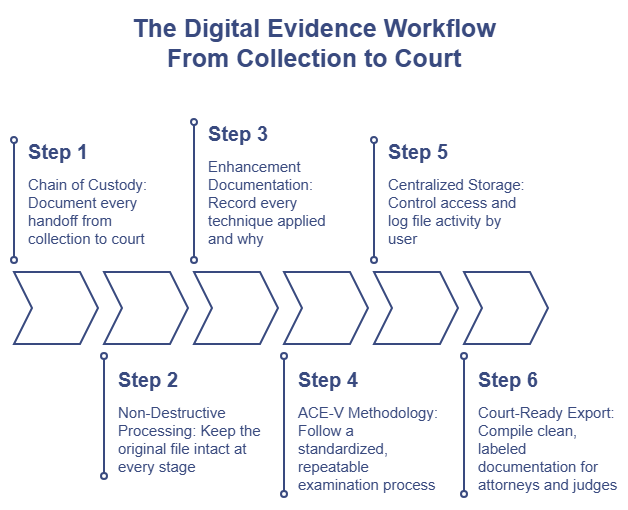
Step 1: Establish Chain of Custody From the Start
The chain of custody begins the moment someone touches a piece of evidence. Not when it reaches the lab. Not when an examiner opens the file.
Every handoff needs documentation. That means capturing who received the evidence, when they received it, and what condition it was in. Any break in that chain creates an opportunity for challenge.
Digital evidence adds complexity here. Unlike physical evidence, digital files can be copied, altered, or deleted without leaving obvious physical signs. A workflow that treats digital evidence like physical evidence, without accounting for file integrity, introduces risk.
To protect integrity, forensic teams need to document:
- The original file source and acquisition method
- Who accessed the file and when
- Any tools used to view, process, or export the file
- The output format and destination of any copies
The goal is a clear, traceable record that shows the evidence arrived in court in the same condition it was collected.
Step 2: Use Non-Destructive Processing Tools
One workflow mistake that creates problems in court: using general-purpose editing software to process forensic images.
General-purpose tools aren’t built with forensic accountability in mind. They lack audit trails, chain of custody features, and the documentation layer that courts expect.
Forensic-grade tools work differently. They apply enhancements as non-destructive adjustment layers, which means the original image stays intact. Another examiner using the same tool can replicate the process and reach the same result.
That replicability matters in court. If a defense expert challenges your analysis, your workflow needs to show that your conclusions came from a verifiable, documented process, not a judgment call made with an untracked editing tool.
When selecting software for latent print analysis or forensic image enhancement, look for tools that separate original files from enhanced versions and that save the adjustment layers applied during analysis.
Step 3: Document Every Enhancement Decision
Processing a latent print image isn’t guesswork. It’s a methodical process, and courts expect examiners to explain it.
For each enhancement, examiners should be able to describe:
- What technique they applied (brightness/contrast adjustment, frequency filtering, channel separation, etc.)
- Why they applied it
- What the image looked like before and after
- Whether the technique is recognized in the forensic community
This level of documentation protects the examiner and the case. It demonstrates that the analysis followed an accepted methodology rather than a subjective process.
Annotation tools that let examiners mark ridge characteristics directly on the image build part of this record. Case notes stored within the evidence management system capture the reasoning behind each decision. Together, they create a record that is easier to explain and harder to attack.
Latent print software that integrates these capabilities into a single platform reduces the risk of documentation gaps and makes courtroom testimony more straightforward.
Step 4: Standardize the ACE-V Process
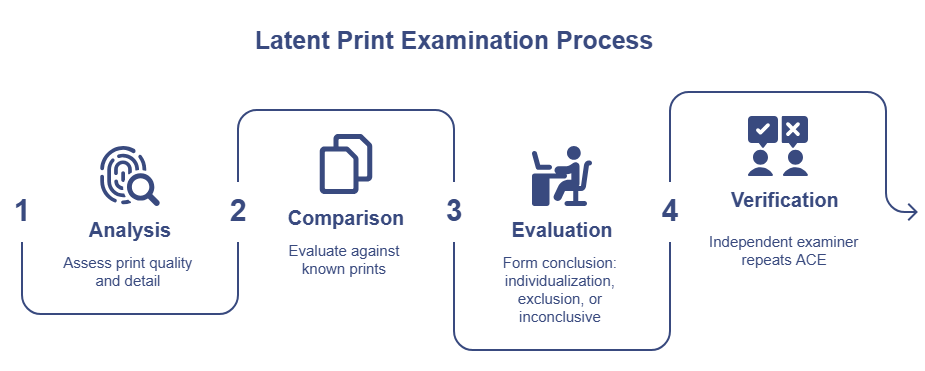
ACE-V, which stands for Analysis, Comparison, Evaluation, and Verification, is the standard methodology for latent print examination. Courts recognize it. Defense experts know it. Your workflow should reflect it at every stage.
Analysis covers the initial examination of the latent print: documenting quality, noting ridge detail, and determining whether the print is suitable for comparison.
Comparison involves placing the latent print alongside a known print and methodically evaluating ridge characteristics. This stage generates the most documentation and produces the foundation for an opinion. For a deeper look at how this process has evolved, see Digital vs. Manual Latent Print Comparison: What Has Changed?
Evaluation is where the examiner forms a conclusion: individualization, exclusion, or inconclusive. The reasoning behind that conclusion needs to be documented, not just the result.
Verification brings in a second examiner who independently repeats the analysis. Agencies that don’t formally document the verification step leave a gap that opposing counsel can exploit. That documentation typically happens outside the platform, through case notes, lab reports, or signed review forms.
Building ACE-V stages into your workflow documentation, not just your verbal process, gives courts a framework they can follow. It also gives your team a repeatable structure that produces consistent results across examiners.
Step 5: Centralize Storage and Access Control
Scattered files create scattered accountability.
When evidence lives in multiple locations, on individual workstations, shared drives, USB drives, or email attachments, tracking access becomes nearly impossible. Examiners can’t confirm whether a file was accessed or modified. Supervisors can’t audit the process. Attorneys can’t get clear answers about who touched what.
Centralized evidence management solves this by creating a single repository with controlled access. Access can be assigned at the file level, so only authorized personnel can view or work with a specific piece of evidence.
That access control supports chain of custody claims in court. When an attorney asks who had access to a file, you need an answer that the system can back up. Platforms that log when a file was opened and when it was saved, tied to a specific user account, provide that documentation layer. Those logs are tamper-proof. No one, including administrators, can edit or delete them after the fact.
Step 6: Prepare Export-Ready Documentation for Court
Strong analysis means nothing if the presentation fails.
Courts and attorneys need evidence presented in a format they can understand and use. That means clean exports, clearly labeled annotations, and summary documentation that ties the analysis back to the methodology.
Before submitting evidence for court, your workflow should include a final review step that checks:
- That all enhancements are labeled and explained
- That annotations reference specific ridge characteristics
- That the examiner’s opinion is supported by documented comparisons
- That the export format matches the original file type to avoid introducing new artifacts
Examiners typically compile this documentation manually, pulling together the enhanced image, annotation notes, and written methodology into a report. Building a consistent template for that process ensures nothing gets left out and gives attorneys a clean package to work with.
Building a Workflow That Scales
Individual cases get resolved. Workflows persist.
The goal isn’t just to build a process that survives one court challenge. It’s to build a process your entire team follows, that produces consistent results, and that you can defend regardless of who’s on the stand.
That means written procedures, trained examiners, software that supports documentation at each step, and regular reviews to close gaps before opposing counsel finds them.
Digital forensic platforms built specifically for law enforcement, with features like non-destructive enhancement, user-level audit trails, and integrated annotation tools, make this easier to achieve and easier to maintain.
The technology doesn’t replace the examiner’s expertise. It supports it. And in a courtroom, that support can make the difference between evidence that stands and evidence that doesn’t.