Total cost of ownership for evidence management software goes far beyond the initial buy price. Many agencies choose a system based on upfront cost. Then they discover hidden expenses in storage, migration, training, and support months later.
Two vendor quotes land on your desk. One costs less upfront, so your agency picks it. Six months later, storage fees climb. Support tickets pile up. Hidden costs the quote never mentioned start adding up.
This happens more than agencies expect. The sticker price on evidence management software rarely tells the full story. The real cost shows up over years, not on day one.
If you’re early in your evaluation process, start with The Complete Guide to Evaluating Evidence Management Software for Law Enforcement Agencies. This post digs into the cost categories agencies overlook. It also shows you how to calculate what a system actually costs over its lifetime.
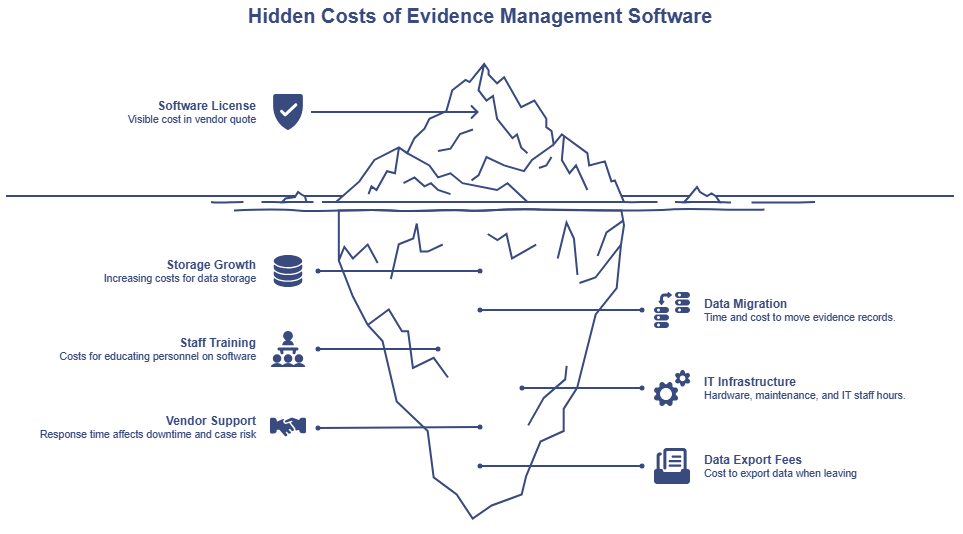
What Is Total Cost of Ownership (TCO)?
Total cost of ownership is the full amount an agency spends on an evidence management system over its useful life. This includes the cost to buy, run, maintain, support, and replace it. It covers far more than the license or subscription fee. TCO includes storage, infrastructure, training, migration, and support, spread across the years your agency uses the system.
Understanding total cost of ownership before you compare vendors helps your agency judge long-term value. That’s a better standard than the lowest initial quote.
Why Purchase Price Isn’t the Full Story
Acquisition cost is what you pay to get a system running. Total cost of ownership is what you pay to keep it running, year after year.
Agencies that compare vendors on price alone often miss this distinction. A lower quote can hide costs that surface later: storage overages, IT hours, training gaps, and support delays. None of these show up on a single invoice. But they add up.
The categories below cover where those hidden costs tend to live. Walking through each one gives your agency a clearer picture before you sign anything.
Storage Costs That Grow Over Time
Evidence volume grows every year. Body cam footage, forensic images, and case files pile up. Video files in particular take up a lot of space.
Many storage plans look affordable at first. The trouble starts as your data grows. Low-cost tiers often come with limits. Once your agency crosses them, the price jumps. An agency storing more body cam footage each year may see storage costs rise, especially once it exceeds an initial pricing tier.
Large forensic data sets need a different kind of storage. Full hard drive images and cell phone extractions can require long-term retention, and in some cases permanent retention. This depends on your agency’s records retention policy and case type. General cloud platforms weren’t built to hold this kind of data well. Storage built for large forensic files handles this workload without the surprise costs that come with generic cloud tiers.
Before you sign with a vendor, ask how their pricing scales as your data grows. Ask what happens to cost when you exceed a storage tier. These answers tell you more about long-term cost than the initial quote does.
This data footprint links to your agency’s physical or cloud setup.
Infrastructure and IT Overhead
On-premise systems come with costs that go beyond the software license. Your agency pays for servers, ongoing maintenance, and IT staff hours to keep everything running. Hardware needs refreshing every few years. That adds another expense most agencies don’t calculate up front.
Cloud deployment shifts much of this burden to the vendor. Server maintenance, security patches, and infrastructure upgrades become the vendor’s job instead of your IT team’s.
Agencies moving away from on-premise systems are often surprised by how much they were already spending to keep the old system alive. Staff hours spent on maintenance rarely get tracked as a software cost. But they are one.
When comparing systems, ask what your IT team currently spends maintaining your evidence management infrastructure. That number belongs in your total cost calculation, even if no one has written it down before.
Training and Onboarding Costs
A new system requires staff to learn it. That time has a cost, even when no line item captures it.
Training costs don’t end after go-live. Staff turnover means new hires need onboarding too, and that need never goes away. A system with a confusing interface adds hours to every new hire’s ramp-up time.
Intuitive design cuts this cost down. So does a vendor that provides on-demand training resources your staff can use whenever they need them. That beats a single onboarding session that’s hard to revisit. For a full look at what onboarding and setup involve, the Evidence Management Software Evaluation Guide covers the migration timeline and vendor questions in detail, including what training looks like at each stage.
But before anyone can train on a new platform, you have to move your records.
Migration Costs
Moving evidence from an old system to a new one takes time and resources. File size and data type both affect how long this takes and what it costs.
Data export is a real cost most agencies don’t plan for early. If your agency switches systems again down the road, ask your current vendor what it costs to export your own data before you start evaluating alternatives. Building that number into your comparison up front means it’s part of your decision, not a surprise on your way out.
If you’re mapping out what a system switch involves beyond cost, the Evidence Management Software Evaluation Guide covers the full migration timeline, from data transfer through go-live.
Migration is a one-time hurdle. Ongoing platform support affects your budget for as long as you use the system.
Support and Downtime Costs
A system needs support at some point. What varies is how much that support costs you in time.
Downtime during an active investigation carries real risk. If your evidence platform goes down and support takes hours to respond, that delay can affect case timelines. Slow support also raises chain-of-custody concerns if evidence access gets interrupted during a critical window.
Ask vendors about their average response time for support tickets. Ask what happens during planned system updates and whether those updates cause downtime. These questions reveal a cost that rarely appears in a sales pitch but shows up fast once you’re a customer.
With all six categories on the table, here’s how to put them together into one number.
How to Calculate Your Real TCO
The most useful way to compare evidence management software is a multi-year cost estimate, not a single quote. Agencies calculate total cost of ownership as:
License + Storage + IT infrastructure + Training + Migration + Support, projected over three to five years.
Map out each category at your projected data growth rate. Then run the total for every vendor you’re considering.
If your agency has already started building a business case for switching systems, How to Build a Business Case for Switching walks through how to calculate what your current system costs you today. Pairing that with a multi-year estimate of a new system gives you a real side-by-side comparison, not two numbers on two invoices.
Before you sit down with a vendor, it helps to have your questions ready.
Before Comparing Vendor Pricing, Ask These Questions
- How is storage billed, and what happens when I exceed a tier?
- What does it cost to export data if I switch vendors later?
- Who pays for migration, and what does it cost?
- Are software updates included in the price?
- Is training included, and does it cover new hires after go-live?
- What happens to support after onboarding ends?
- What is the average response time for support tickets?
Here’s how those categories tend to show up, or not show up, on a vendor’s initial quote.
Where the Hidden Costs Show Up
| Cost Category | Often Included in Quote? | Long-Term Impact |
|---|---|---|
| Software license | Yes | Medium |
| Storage growth | Sometimes | High |
| Data migration | Sometimes | High |
| Staff training | Rarely | Medium |
| IT infrastructure | Rarely | High |
| Vendor support | Varies | High |
| Data export fees | Sometimes | High |
The categories with the biggest long-term impact are also the ones vendors are least likely to itemize upfront. That’s why a single quote isn’t enough to compare on.
The Real Comparison Takes More Than One Number
The lowest quote is not always the lowest cost. A full total cost of ownership analysis helps your agency compare vendors on what they’ll actually spend over the next three to five years, not only what appears on the first invoice.
Before your next demo: Download the Evidence Management Software Requirements Checklist to make sure you’re asking vendors the hard questions about long-term storage tiers and data export costs.
Frequently Asked Questions
What is total cost of ownership in evidence management software?
TCO covers more than the license fee. It accounts for storage, infrastructure, training, migration, and support costs an agency pays over the years it uses the system.
How much does evidence management software cost beyond the license fee?
Storage costs grow as evidence volume increases. IT staff spend time on maintenance. New hires need training. Support tickets take staff time to resolve. These costs, not just the license fee, make up your total cost of ownership.
What hidden costs should agencies expect when evaluating evidence management software?
The most common hidden costs are storage overages as data grows, data export costs when leaving a vendor, IT maintenance hours on on-premise systems, and ongoing training for staff turnover. Asking vendors about each of these before signing helps avoid surprises.
How do agencies calculate total cost of ownership for evidence management software?
Build a multi-year cost estimate instead of comparing single quotes. Include licensing, storage at your projected growth rate, IT overhead, training, migration, and support across three to five years. Comparing that total across vendors gives a more accurate picture than year-one pricing alone.