Finding the right evidence collection software is one of the most consequential decisions your agency can make. The wrong platform leads to lost data, a broken chain of custody, and evidence challenges in court. Yet many agencies still rely on personal devices, manual transfers, and paper logs to manage field-collected evidence.
So, what is evidence collection software? It is a purpose-built platform that helps law enforcement capture, store, and track digital evidence. It covers both field collection and public submissions. It replaces improvised workflows with a structured, auditable process that creates defensible documentation at every step.
Not all platforms are equal. Knowing what to look for before you buy saves time, money, and headaches. If you are just getting started, our guide to digital evidence collection software for police covers the landscape before you dive into vendor comparisons. This post walks you through the criteria your agency should use to evaluate your options.
Why Generic Tools Fall Short for Evidence Collection
Before evaluating purpose-built platforms, it helps to understand why improvised solutions create problems.
Email, shared drives, and USB transfers are common workarounds. They are familiar and available. But they were not designed for law enforcement evidence intake.
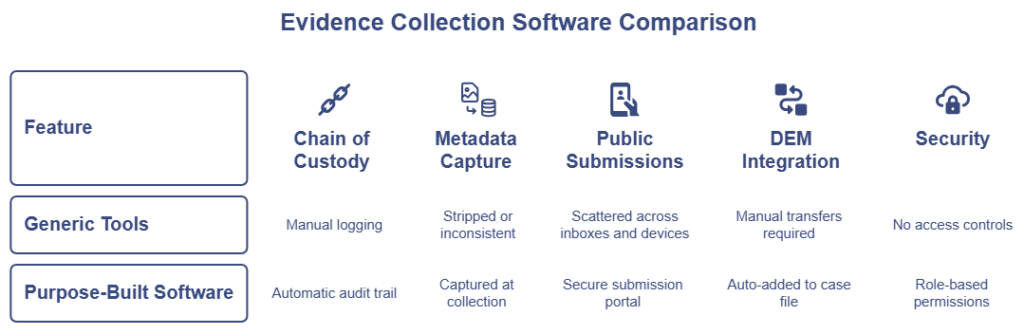
When a witness emails a photo, there is no reliable audit trail. There is no structured metadata capture. There is no way to confirm the file was not altered before it arrived. When an officer transfers footage from a personal device to a shared drive, each step introduces potential chain-of-custody questions.
Purpose-built evidence collection software closes those gaps at capture. Files are logged the moment they enter the system. Metadata is recorded automatically. The digital evidence workflow moves forward without manual handoffs or undocumented transfers.
Evaluate the Mobile Evidence Collection Experience
Your officers are busy. They are documenting scenes, talking to witnesses, and managing unpredictable situations. Any tool they use in the field has to be fast, intuitive, and reliable.
Start your evaluation by asking: how does this tool perform in the field?
Look for a mobile-first design that works on tablets or smartphones. Officers should capture photos, video, and documentation without switching between apps or devices. The interface should require minimal training.
Field usability is not a nice-to-have. It is a baseline requirement. If the app is frustrating, officers will work around it. That workaround usually means personal devices and manual uploads. Both create serious documentation problems.
What Evidence Collection Software Should Do for Chain of Custody
Chain of custody is the backbone of any evidence collection process. In court, gaps in documentation can affect how much weight a judge or jury gives to the evidence. One unclear handoff or missing timestamp can give the defense the opening they need.
The software you choose should automatically log the chain of custody. That means timestamping every file the moment it enters the system. It means recording GPS coordinates when available and location services are enabled. It means tracking who accessed the file, when, and why.
Manual processes can be legally sufficient when done correctly. But they are more error-prone. Officers get busy. Timestamps get forgotten. Purpose-built evidence collection software reduces that risk by handling documentation in the background. No extra steps required from the officer. For a deeper look at where documentation gaps tend to appear, see our breakdown of how to maintain chain of custody from the moment of capture.
Ask your vendor directly: what gets logged automatically, and what requires manual input? The answer tells you a lot about how the platform was designed.
Why Metadata Matters in Evidence Collection Software
Metadata is the invisible layer of information attached to every photo and video. It includes the time of capture and GPS location when available. It also includes the device used and, in some cases, a file hash for integrity verification. This information is critical during legal proceedings.
When evaluating digital evidence collection software, check what metadata gets captured and how it is stored. The platform should record metadata at the moment of capture, not during upload. Delay creates gaps. Gaps create questions. Questions create doubt.
Strong metadata capture also protects your officers. It provides an objective record of when and where evidence was collected. That matters when a case goes to trial or when someone disputes the facts.
Look for platforms that store metadata alongside the file in an auditable log. It should be readable by investigators and exportable for legal review.
Secure Evidence Intake and Storage
Evidence data is sensitive. It includes crime scene photos, witness footage, and case documentation. Your platform needs to protect that data at every stage of the digital evidence workflow.
During your evaluation, ask about encryption. Evidence should be encrypted during transfer and at rest. Ask where data is stored and who has access. A cloud-based platform should use strong security controls appropriate for law enforcement evidence data.
Ask about role-based access controls, too. Not everyone in your agency needs access to every case file. Strong software lets administrators define who can view, upload, or export evidence based on their role.
Security is not just about protecting data from outside threats. It is also about maintaining integrity within your agency. A proper access log shows exactly who touched what and when.
How Evidence Collection Software Should Handle Public Submissions
Crime investigations do not happen in a vacuum. Witnesses see things. Bystanders capture video on their phones. That footage can be valuable, but collecting it is often a logistical challenge.
Some agencies still rely on email submissions or USB drops. Those methods create serious documentation problems. There is no reliable audit trail. There is no structured metadata capture. There is limited ability to verify a file’s origin.
Modern platforms address this with a secure submission portal. Investigators send a link to a witness or member of the public. The recipient uploads photos or videos from their own device. No app download is required.
A well-built submission portal captures metadata at the point of receipt. It ties the file to the case record automatically. That does not eliminate uncertainty about what happened to the file before upload. But it creates a far more defensible starting point than email or USB.
When evaluating platforms, test the public submission flow yourself. Is it simple enough for a non-technical person to use? Does it work on any smartphone? Does the submission appear in the case file with logged metadata? If the answer to any of those is no, keep looking.
Integration With Your Digital Evidence Workflow
Field evidence collection software does not exist in isolation. It needs to connect with your broader evidence management system. If the two do not communicate well, your agency ends up with data silos and manual workarounds.
During your evaluation, ask how the platform integrates with your existing digital evidence management (DEM) system. Evidence collected in the field should flow into the case file without manual transfers or reformatting.
Manual transfers are where the chain of custody weakens. An officer transfers files from a personal device to a shared drive. A detective downloads and reuploads. Each step introduces risk. A closed-loop digital evidence workflow reduces those steps.
The strongest platforms connect field capture and evidence management in the same ecosystem. Evidence captured at the scene feeds into the DEM platform with no extra handling. That continuity creates defensible documentation from scene to case file.
Scalability and Support for Your Agency’s Size
Your agency has unique needs. A platform built for a major metropolitan department may be overkill for a smaller agency. A platform built for small agencies may not scale when your caseload grows.
Ask vendors how their platform scales. Can it handle your current volume of cases and evidence files? What happens when your storage needs grow? Is pricing structured in a way that fits your budget?
Support matters too. When something goes wrong, you need a team that understands law enforcement workflows. Look for vendors who offer dedicated onboarding, training resources, and responsive customer support. Ask for references from agencies similar in size to yours.
A long implementation timeline can disrupt operations. Ask how long it takes to get your agency up and running, and what that process looks like in practice.
Questions to Ask Before You Sign
Before you commit to any digital evidence collection software, run through these questions with the vendor:
Chain of custody: Does the platform log every action automatically? Can you produce a full audit trail for any file?
Field usability: Can officers use this tool without extensive training? Does it work in areas with poor connectivity?
Public submissions: Does the platform support secure witness submissions? Is the process simple enough for a non-technical user?
Metadata capture: Does the system capture timestamps, GPS when available, and device data at the moment of collection?
Integration: Does field evidence collection connect to your DEM platform? Are there manual steps in the transfer process?
Security: How is data encrypted? What access controls are available? Who can view case files and under what conditions?
Data retention: Can the platform enforce retention schedules and preserve evidence for active cases or legal holds?
Support: What does onboarding look like? Is there a dedicated support team familiar with law enforcement?
These questions cut through the marketing language and get to what actually matters when evidence is on the line.
Frequently Asked Questions About Evidence Collection Software
What is evidence collection software?
Evidence collection software is a purpose-built platform that helps law enforcement capture, upload, and track digital evidence. It covers both field collection and public submissions. It replaces manual workflows with a structured, auditable process.
How is evidence collection software different from a regular evidence management system?
A digital evidence management system stores and organizes evidence. Evidence collection software focuses on the capture side. It covers how evidence gets into the system in the first place. The strongest platforms connect both functions in one closed-loop digital evidence workflow.
What should agencies look for in evidence collection software?
Key criteria include automatic chain of custody logging, metadata capture at the moment of collection, a secure submission portal for public submissions, encryption, role-based access controls, and integration with a DEM platform.
Can witnesses submit evidence through these platforms?
Some platforms include a secure submission portal. Investigators send a link to a witness or member of the public. The recipient submits photos or videos from their own device with no app required. The platform logs metadata at receipt and ties the file to the case record.
Does evidence collection software replace standard operating procedures?
No. Software supports and documents your procedures, but it does not replace them. Agencies still need clear SOPs and training to ensure evidence is handled correctly at every step.
The Right Evidence Collection Software Protects More Than Evidence
Good evidence collection software does more than store files. It protects your cases. It protects your officers. And it protects the integrity of the justice process.
When evidence enters the digital evidence workflow correctly from the start, prosecutors have what they need. Defense attorneys have fewer openings. Courts receive documentation that supports legal review at every stage.
That is the real value of getting this decision right. It is not about technology for its own sake. It is about building a reliable, auditable process that supports your agency from scene to courtroom.
Take your time with the evaluation. Ask hard questions. And choose digital evidence collection software built for the work your agency does every day. To make your vendor comparison easier, download the Mobile Evidence Collection App Evaluation Checklist, a free, field-ready resource that covers chain of custody, DEM integration, and key vendor criteria side by side.
VeriPic’s evidence collection tools, including Evi-Pad for field capture and Witness Upload for public submissions, connect to the VeriPic DEM platform. The result is a closed-loop digital evidence workflow with automatic chain of custody logging from scene to case file. Learn more about how VeriPic supports law enforcement agencies.