Chain of custody problems can start at the scene, not only in the evidence room.
Chain of custody gets treated like a paperwork problem in a lot of agencies. Something to handle back at the office after the scene clears and the evidence bags. That approach creates a gap. Gaps are what defense attorneys exploit.
Chain of custody begins the moment evidence is captured. A photo taken on a personal phone. A video transferred through a USB drive. A file emailed to a supervisor. Each of those steps introduces a vulnerability. Vulnerabilities give defense attorneys something to work with. That is true even when the underlying evidence is solid.
Strong chain of custody depends on both process and technology. This post covers what proper chain of custody looks like at every stage of collection. It explains why the capture point is a vulnerable stage. And it shows how digital evidence collection software closes the gaps traditional workflows leave open.
What Chain of Custody Actually Means
Chain of custody is a documented record. It covers who collected evidence, when they collected it, how they handled it, and who had access to it afterward.
Courts use that record to verify authenticity. Courts do not require a perfect chain. They look for reasonable assurance that the evidence is authentic and unchanged. Defense attorneys look for unexplained transfers, inconsistent timestamps, and undocumented access points. They use those gaps to challenge credibility. That challenge can reduce the weight evidence carries with a jury.
The chain does not start when evidence reaches the property room. It starts at the scene.
Chain of custody failures can happen at any stage. The capture point is a vulnerable one. Officers capture photos on personal devices. Files get transferred through unofficial channels. Timestamps shift when media moves between systems. None of those steps are malicious. But they all create questions that prosecutors struggle to answer under cross-examination.
Why the Capture Point Is a Vulnerable Stage
Think about what happens when an officer photographs a scene with a personal smartphone.
The image gets taken. It lives on the officer’s personal device alongside thousands of other photos. At some point, it gets transferred via text, via email, or by plugging into a computer. The file’s metadata may shift during that transfer. The original timestamp may not match the department’s records. No automatic log shows who accessed the file between capture and submission.
That sequence of events is not hypothetical. It plays out in agencies of all sizes. Using a personal device does not disqualify evidence. Officers can still testify to authenticity. But it forces prosecutors to answer questions they should not have to answer. It creates friction that a clean workflow eliminates.
The same problem exists when investigators collect witness footage. A witness might text a video to an officer’s phone. The officer downloads it, transfers it, and logs it by hand. Every manual step is a potential failure point and a potential argument for the defense.
The 5-Part Chain of Custody Checklist for Digital Evidence
A strong chain of custody record answers five questions without ambiguity. Check every piece of digital evidence against this list before it reaches the case file.
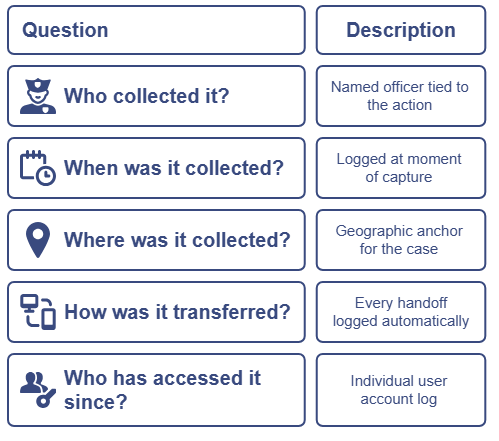
1. Who collected it? The record should name the officer or investigator responsible for capture or intake. Not a badge number alone. A named, documented individual tied to the action.
2. When was it collected? The timestamp should reflect the moment of capture, not the moment of upload or logging. Systems that log timestamps at capture provide a stronger record than those that log at transfer.
3. Where was it collected? GPS metadata attached at capture gives the case a geographic anchor. This matters when establishing crime scene context.
4. How was it transferred? Every handoff should be logged from field to server, from intake to storage, from storage to review. Manual logging creates gaps. Automated logging closes them.
5. Who has accessed it since? An access log tied to individual user accounts creates accountability at every stage. If a question arises about whether evidence was viewed or changed, the system should answer it.
When your workflow handles all five of these, defense attorneys have fewer opportunities to challenge the record. Prosecutors can walk a jury through every step with confidence.
Common Chain of Custody Mistakes to Avoid
Even agencies with strong policies make chain of custody mistakes. A few patterns come up again and again.
Capturing on personal devices. Personal phones lack the metadata controls and upload automation of dedicated evidence tools. Evidence captured on a personal device is not disqualified. But it requires more work to defend in court. Under Federal Rule of Evidence 901, digital evidence must be authenticated. Manual transfers, undocumented handoffs, and shifted metadata all make that harder to prove.
Manual file transfers. USB drives, email attachments, and shared folders introduce transfer points that break documentation continuity. Each transfer is an opportunity for metadata to shift or access to go unlogged.
Delayed logging. When officers wait until they return to the station to document field captures, a gap opens between capture and record. That gap becomes a liability. Real-time upload eliminates it and the difference matters more than agencies realize until it surfaces in court.
No witness intake process. Accepting witness footage without a documented intake workflow creates the same vulnerabilities as mishandled field evidence. That means a secure link, metadata capture, and case file attachment for every submission.
Inconsistent access controls. If multiple users can access evidence files without individual logging, the record cannot account for every access point. Role-based access with automated logging solves this.
Every one of these mistakes has a fix. It is a process fix, reinforced by the right technology and the right training.
How Automated Documentation Closes the Gap
Consistent SOPs and officer training set the foundation. Technology reinforces it by removing the manual steps where documentation breaks down.
When evidence gets captured through a dedicated platform, documentation happens at the same moment. VeriPic’s Evi-Pad gives officers a field-facing tool to capture photos, video, and documentation at the scene. The moment they capture something, Evi-Pad logs it with a timestamp, GPS coordinates, and chain of custody metadata. The file uploads into VeriPic’s Digital Evidence Management system. No manual transfer. No undocumented gap between capture and record.
From the moment of capture, the evidence has a complete documented history. The system knows when it was taken, where it was taken, who took it, and every access point afterward. That record does not require an officer to fill out a form or remember to log anything. It happens every time, without manual input.
Witness-submitted evidence gets the same treatment. VeriPic’s Witness Upload lets an investigator send a secure link to a witness or member of the public. The witness uploads footage from their own device with no app required. When the file enters the system, VeriPic logs the submission with metadata, timestamps, and chain of custody documentation. It ties directly to the case record. The investigator never handles an unsecured file. The evidence enters the system with a clean, verified intake record from the start.
Together, Evi-Pad and Witness Upload create a closed-loop workflow. Field evidence and public submissions both feed into one secure, auditable system with no manual steps and no undocumented gaps.
Building a Workflow That Holds Up in Court
Strong chain of custody does not happen by accident. It requires deliberate process, consistent training, and tools that reinforce both.
Start at the point of capture. Officers should use a dedicated capture tool with automatic metadata logging and direct system upload. Standardize how witness footage comes in. Every submission should go through a documented intake process. Audit access controls so every interaction with evidence ties to an individual user.
At every stage, the question is the same: can you prove what happened to this evidence, when it happened, and who touched it?
If the answer requires an officer to remember, reconstruct, or verify by hand, the workflow has a gap. This guide walks through how to build a digital evidence workflow that holds up in court step by step, from intake to courtroom.
The Takeaway
Chain of custody is not a documentation task. It is a capture-time discipline.
Agencies that defend evidence well treat every capture point as a documentation moment. They back that discipline with clear SOPs and trained officers. They use tools that log at capture, transfer without manual steps, and tie every file to a verifiable record the instant it gets created.
That discipline starts the moment evidence is captured, before the scene ever clears.
If your current workflow leaves a gap between capture and documentation, that gap is costing you case integrity one file transfer at a time.
VeriPic’s evidence collection platform gives law enforcement agencies the tools to close that gap. Learn how Evi-Pad and Witness Upload work together to protect chain of custody from field to courtroom.