Every case starts somewhere specific.
A homeowner’s doorbell camera records a suspect leaving the scene. An officer photographs the point of entry. A neighbor catches it on their phone. Within an hour, footage exists on civilian devices, department cameras, and systems that the agency may not yet be aware of.
The question is not whether agencies can collect that evidence. The question is whether they can consolidate it into a single, secure, and auditable system without breaking the chain of custody.
For many agencies, the answer involves manual transfers, personal devices, and documentation filled in after the fact. Each workaround introduces risk. Gaps form before evidence reaches the system. Defense attorneys know how to find them.
Digital evidence collection software closes those gaps. This guide covers what law enforcement evidence collection software is, how it works, where workflows break down, and how agencies can build a process that holds up from scene to courtroom.
What Is Digital Evidence Collection Software?
Digital evidence collection software gives officers and investigators a structured, department-managed path to capture, document, and submit evidence from the point of collection forward.
That distinction matters. A digital evidence management (DEM) system handles the lifecycle of evidence once it enters the system. It covers storage, access control, sharing, and audit trails. Evidence collection software handles the front end. It governs what happens before evidence enters the system, and that moment determines the integrity of everything that follows.
The best platforms connect both. When an officer captures a photo in the field, the file moves directly into the DEM system. Metadata and chain of custody documentation attach automatically. No manual step required.
That connection is where many agencies have the widest gap. Understanding what a digital evidence management system actually does helps clarify why the front end matters.
What Types of Digital Evidence Do Law Enforcement Agencies Collect?
Digital evidence takes many forms. Each type carries different documentation requirements.
Photos and video represent the largest volume for patrol officers, detectives, and crime scene units. Field-captured files need a documented chain from capture to system. Civilian-submitted footage needs the same clean path into the case file.
Audio recordings include interviews, 911 calls, and body-worn audio. These files require the same metadata logging and access controls as visual evidence.
Documents and field notes captured at the scene need to tie to the case file with the same rigor as photos and video. Written statements, sketches, and supplemental notes all count.
Metadata is evidence in its own right. Timestamps and file identifiers attach at the point of capture. They can confirm when footage was recorded or corroborate a civilian’s account. Metadata lost during a manual transfer cannot be recovered.
Civilian-submitted media is a growing category. Doorbell cameras, parking lot security systems, and phone recordings generate footage investigators need. Getting that footage into the case file requires a structured submission path.
Each evidence type flows through the digital chain of custody differently. A strong law enforcement evidence collection platform accounts for all of them.
The Evidence Lifecycle: From Capture to Case Closure
Evidence collection is the first stage of a longer process. A weak front end creates problems at every stage that follows.
Capture is where the chain of custody begins. An officer photographs a scene. A civilian submits doorbell footage. A detective records a statement. Every file has an origin point, and that origin point needs documentation.
Upload and intake is where field-collected evidence enters the system. This is where documentation gaps can form if files move through hands or storage that falls outside the agency’s audit trail.
Storage and access control determines who can view, edit, or export evidence files. Role-based permissions protect integrity and limit exposure.
Sharing and disclosure covers inter-agency transfers, prosecutor access, and discovery requests. A clean chain of custody at the front end makes this stage faster and less complicated.
Court preparation and presentation is where front-end gaps surface. Evidence that changed hands without documentation becomes a liability.
Building a digital evidence workflow that holds up in court requires getting the front end right. Every stage after capture depends on it.
Common Problems with Digital Evidence Collection in Law Enforcement
The front end of evidence collection is where chain of custody gaps are hardest to close after the fact. These are the failure points that appear most often.
Manual transfers from cameras and memory cards create a gap between capture and intake. Files move through hands that may not appear in the chain of custody record.
Personal device use in the field happens when officers default to phones because it is faster. Photos taken outside a department-managed path may never enter the system with complete documentation.
No structured path for civilian media leaves investigators relying on email, USB drops, or informal handoffs. None of those methods produce an automatic chain of custody entry.
Hand-filled chain of custody logs get completed after the fact. They depend on the officer’s memory. Gaps in timing, location, or handling are easy to challenge.
Metadata loss during transfer happens when files move through intermediate storage or email. Timestamps and file identifiers accurate at capture may not survive the transfer.
Evidence sitting in email inboxes or on USB drives creates storage outside the system, outside the audit trail, and outside the agency’s control.
Each failure point carries downstream consequences. How digital evidence management fixes chain of custody problems starts with eliminating these gaps at the collection stage. The true cost of thumb drives and CDs for evidence sharing shows how physical media workflows compound those risks.
How Modern Digital Evidence Collection Software Works
The right field evidence collection software eliminates the gap between capture and system. Here is how that works across three core workflows.
Field Collection
Officers need a department-managed capture path they can use at the scene. Mobile evidence collection software gives officers a field-facing interface to capture photos, video, and documentation from a tablet or mobile device.
When an officer captures evidence, the file uploads directly into the DEM system. No manual transfer. No intermediate storage. The upload logs automatically with:
- Timestamp of capture
- Officer credentials
- Chain of custody entry
The chain of custody starts at the scene, not at a desk. Investigators can trace every file back to the moment it was collected. When the chain starts at capture and stays unbroken, challenges to evidence handling have less ground to stand on.
Agencies evaluating their current setup should start with the five signs that indicate a need for a digital evidence management system.
Civilian Submission
Field officers are not the only ones with relevant footage. A homeowner’s doorbell camera captured the suspect. A neighbor recorded the incident before officers arrived. A business owner pulled footage from a parking lot camera.
Getting that footage into a case file requires a clear, structured submission path. There are two ways this works in practice.
An officer at the scene can send a citizen a case-specific link on the spot. Or a civilian can go directly to the agency’s secure upload portal and submit footage without waiting for a link. Either way, the citizen opens the link on their device and submits photos or videos without downloading an app.
Every submission logs automatically with:
- Submission timestamp
- Submitter information
- Chain of custody entry
Every submission enters the DEM system for officer review. Once reviewed, the officer assigns the footage to the relevant case. Nothing reaches a case file without a deliberate decision by agency personnel.
Digital evidence sharing best practices apply from the moment of submission.
Centralized Management
Collecting evidence from the field and the public solves the front end. What happens once evidence enters the system matters just as much.
A centralized DEM platform gives investigators, supervisors, and prosecutors one place to access, review, and track all case evidence. The audit trail logs every action taken on a file after intake. It records who opened it, who exported it, and when. That visibility protects the agency from claims of improper handling and gives prosecutors a complete, readable record to support the case.
Digital evidence security depends on this layer as much as it depends on the collection tools feeding into it.
Why This Matters Beyond the Courtroom
Chain of custody integrity is a legal requirement. The operational benefits of strong police evidence collection software go further than case outcomes.
Faster case preparation. When evidence enters the system with accurate metadata and a complete chain of custody, investigators spend less time on documentation and more time building the case.
Reduced liability. Agencies face exposure when evidence handling is inconsistent or undocumented. Automatic logging reduces the opportunity for human error and the disputes that follow.
Better resource allocation. Manual evidence transfers consume officer and staff time. Eliminating those transfers puts hours back into investigative work.
Stronger public trust. Agencies that demonstrate rigorous evidence handling build long-term credibility with the public and with the courts.
Collection-stage gaps can contribute to discovery complications down the line. Common discovery mistakes that cost agencies time and credibility in court are worth understanding before they surface in your cases.
Key Features to Compare Across Evidence Collection Software Platforms
Not all law enforcement evidence collection tools deliver the same level of integrity. Here are the features that matter most when evaluating platforms.
Automatic chain of custody logging from the point of capture. The system should log every collection event without manual input. Documentation completed after the fact carries a gap.
Timestamp metadata attached at capture. Time data should attach at the moment of capture, not at upload. The difference matters when evidence needs to be correlated with other case files.
A department-managed capture path. Officers should have a purpose-built tool for field collection that keeps evidence on a documented path from capture to system. Agencies that rely on personal devices without a structured workflow introduce documentation gaps that are difficult to close later.
Secure civilian submission with no app download barrier. A link that requires an app download creates a drop-off point. Civilians who do not complete the download may submit footage through an undocumented channel instead.
Officer review before case assignment. Civilian submissions should enter the DEM system for officer review before reaching a case file. That review step keeps agency personnel in control of what evidence gets assigned and where.
Audit trail visibility readable without technical expertise. Supervisors and prosecutors need to access and understand the audit trail without IT support.
Direct integration with the agency’s DEM platform. Collection tools that feed into a separate system create a new gap rather than closing the old one.
Role-based access controls. Not every user needs access to every file. Permissions should reflect investigative roles and limit exposure to sensitive evidence.
Scalability across unit types. Patrol officers, detectives, and crime scene units have different collection needs. The platform should serve all of them without requiring separate workflows.
Switching to digital evidence management is easier when agencies evaluate these features before selecting a platform. The chain of custody FAQ for digital evidence management covers the documentation standards that platform features need to support.
How to Choose and Implement the Right Evidence Collection Software
Selecting the right platform is only part of the process. Implementation determines whether the software closes the gaps it promises to close.
Start with a workflow audit. Map where your chain of custody currently begins and identify every point where evidence changes hands before entering the system. Those handoff points are where gaps tend to form.
Identify which unit types need which tools. Patrol may need field evidence collection software. Investigators may need civilian submission tools. Some units need both. Evaluate the platform against actual collection workflows across the agency.
Confirm integration with your existing DEM system. A mobile evidence collection app that does not connect directly to your DEM creates a new workflow rather than improving the existing one. Integration is not optional.
Pilot with one unit before agency-wide rollout. A controlled pilot surfaces adoption challenges and workflow gaps before they affect the full agency.
Train officers before launch. Adoption drives integrity. Officers who understand why the tool matters use it consistently.
Establish a chain of custody policy that reflects the new digital workflow. The software creates the structure. Policy ensures officers follow it. Both are required.
The complete guide to digital evidence management for law enforcement covers the broader system context that evidence collection software fits into.
Frequently Asked Questions About Evidence Collection Software
What is digital evidence collection software?
Digital evidence collection software gives law enforcement agencies a structured, department-managed path to capture, document, and submit evidence from the point of collection. It handles the front end of the evidence lifecycle, before evidence enters the digital evidence management system, and that moment determines the integrity of everything that follows.
How is evidence collection software different from a digital evidence management system?
A digital evidence management (DEM) system handles evidence once it enters the system: storage, access control, sharing, and audit trails. Evidence collection software handles what happens before that. The best platforms connect both so evidence flows from capture directly into the DEM system with no manual step required.
Can civilians submit evidence directly to law enforcement through this software?
Yes. Civilians can go directly to the agency’s secure upload portal and submit footage without waiting for a link. An officer or investigator can also send a case-specific link directly to a witness or member of the public. Either way, the recipient submits from their own device without downloading an app. Every submission enters the DEM system for officer review before being assigned to a case.
How do police maintain chain of custody for digital evidence?
Chain of custody for digital evidence starts at the point of capture, not at intake. Field evidence collection software that uploads directly to the DEM system logs the timestamp and officer credentials automatically. That eliminates the manual transfer step where chain of custody gaps commonly occur.
What features should law enforcement agencies look for in evidence collection software?
Key features include automatic chain of custody logging from the point of capture, timestamp metadata attached at capture, a department-managed capture path for field officers, secure civilian submission with no app download barrier, officer review before case assignment, direct integration with the agency’s DEM platform, role-based access controls, and audit trail visibility readable without technical expertise.
What is mobile evidence collection software?
Mobile evidence collection software gives officers a field-facing app or tablet interface to capture photos, video, and documentation at the scene. Files upload directly into the agency’s DEM system on capture. No memory card transfer or manual upload required.
A Closed-Loop Workflow in Practice: How VeriPic Does It
The strongest evidence collection workflows share one characteristic. They keep every piece of evidence inside a single, auditable system from capture to case closure.
VeriPic’s EviPad and Witness Upload features build that closed loop across field and civilian collection.
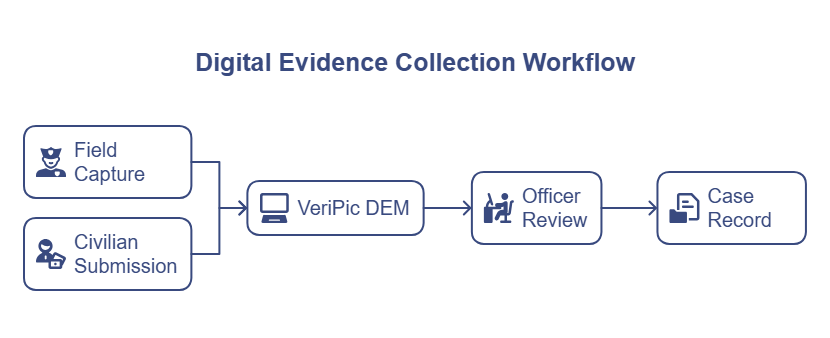
Here is what that workflow looks like:
- An officer captures photos and video at the scene using EviPad, VeriPic’s field-facing mobile evidence collection tool
- Files upload directly into the VeriPic DEM system with automatic metadata and chain of custody logging
- The officer sends the homeowner a case-specific Witness Upload link, or the civilian goes directly to the agency’s secure portal and submits footage
- The civilian submits doorbell camera footage through the secure link without downloading an app
- Every submission enters the DEM system for officer review before being assigned to the case
- Supervisors and prosecutors access all evidence through one platform with a complete audit trail
No manual transfers. No undocumented storage. The chain of custody starts at the scene and stays intact through case closure.
The Bottom Line
Digital evidence collection software is not a technology upgrade. It is a workflow transformation.
The gap between the field and the system is where chain of custody problems begin. Agencies that close that gap produce cleaner cases, reduce legal exposure, and free investigators to focus on work that matters.
The tools exist. The workflow is achievable. The question is how much the current gap in your agency’s process is costing you in time, in legal risk, and in cases that could have been stronger.
VeriPic’s EviPad and Witness Upload features connect field evidence collection and civilian submissions directly to your DEM system. Contact VeriPic to learn how your agency can build a closed-loop evidence collection workflow.