When a witness has footage, investigators want it fast. So what do most agencies do? They give out an email address and ask people to send what they have.
It seems simple enough. But simple for the witness often creates work for the investigator.
The file lands in an inbox. Someone has to find it, download it, and figure out where it belongs. That’s extra steps, extra room for error, and one more thing to track in an already busy investigation.
For agencies evaluating evidence collection software, how you collect from the public is part of the equation. There’s a better way to handle it.
The File Size Problem
There’s a practical problem with email that stops investigators before they even get started.
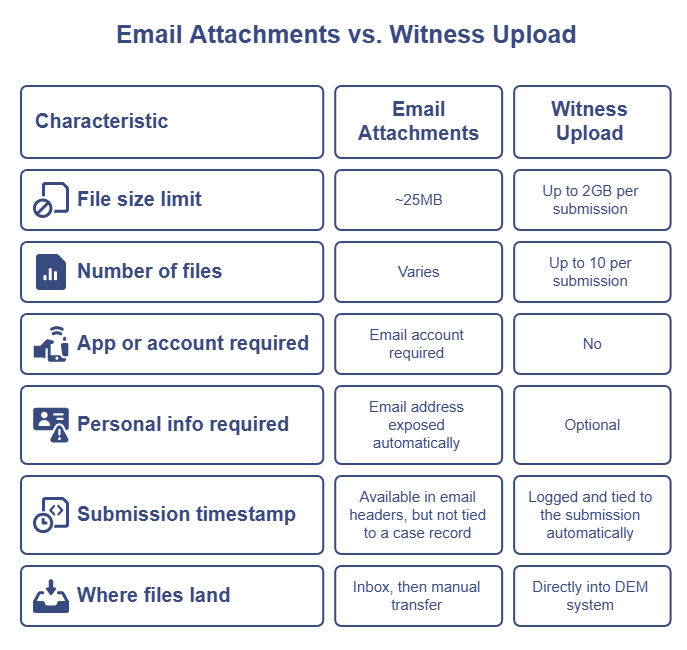
Most email systems cap attachments around 25MB. A short video from a modern smartphone can blow past that easily. When that happens, witnesses have to compress the file, split it into pieces, or give up entirely.
Witness Upload handles up to 10 files and 2GB of data per submission. A witness can send full-length video, multiple photos, and supporting documents in one shot without hitting a wall.
That alone removes one of the most common friction points in collecting digital evidence from the public.
No Account, No App, No Personal Information Required
Witnesses don’t need to download an app. They don’t need to create an account. And they don’t need to hand over any personal information if they don’t want to.
That distinction matters. When a witness sends evidence by email, their personal address goes along with it automatically. In sensitive cases, that can create hesitation at exactly the moment you need cooperation.
With Witness Upload, a witness submits through a secure link without sharing anything about themselves. If they want to include their name or a description of what they captured, they can. But nothing is required.
Fewer Delivery Failures, Less Back and Forth
With email, large files bounce, get blocked, or arrive compressed and degraded. Witnesses end up splitting files, switching to a different platform, or giving up.
Witness Upload accepts images, video, audio, and documents up to 2GB. What the witness sends is what you receive, without the back and forth that comes when email gets in the way.
Submissions Land in the System
When a witness submits through Witness Upload, the files land directly inside VeriPic’s Digital Evidence Management system. Each submission is timestamped and organized, ready for an investigator to review and attach to a case.
Centralizing submissions also helps agencies maintain a clearer record of when evidence was received and how it entered the system without anyone having to reconstruct it manually afterward.
Compare that to email, where a file sits in an inbox until someone manually downloads it, renames it, and moves it to the right place. With Witness Upload, that organizational work is already done.
A Side-by-Side Comparison
What It Actually Looks Like in Practice
Picture this. You’re three days into a hit and run investigation. A witness texts saying they have dashcam footage. You give them your department email. They try to send it but the file is too large. They compress it and try again. You download it, realize the quality is degraded, and follow up asking them to try a different way. They go quiet.
That sequence won’t feel unfamiliar to investigators. It’s not anyone’s fault. It’s just what happens when you use a communication tool for something it wasn’t built to do.
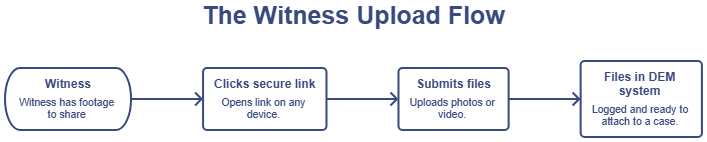
Now picture the same situation with Witness Upload. You send the witness a secure link. They click it, select the file, and hit submit. The original footage lands in your system, timestamped, a few minutes later. No back and forth. No degraded copy. No chasing.
The case doesn’t wait on the witness figuring out how to send a large file. You get what they captured, the way they captured it.

Some Cases Where Witness Upload Makes a Real Difference
Some case types are a natural fit for collecting evidence from the public. These are some of the situations where a structured submission tool makes a real difference.
Hit and runs. Bystanders with dashcam or phone footage are common. Getting that footage quickly and intact can make or break the investigation.
Neighborhood incidents. Vandalism, property crimes, and disturbances often happen in areas with multiple potential witnesses. A submission link can go out broadly and collect footage from several sources at once.
Assaults in public spaces. Crowded areas mean bystander video is likely. Witnesses at a scene may not want to stick around but will submit footage later if the process is simple enough.
Large-scale events. Incidents at concerts, sporting events, or public gatherings can generate footage from dozens of angles. Email can’t handle that volume. A structured submission tool can.
In each of these scenarios, the easier you make it for witnesses to submit, the more likely they are to follow through.
What Changes for Investigators
The shift is mostly felt in what investigators no longer have to do.
No tracking down which inbox a file went to. No downloading and organizing attachments manually. No following up with a witness because their video was too large to send.
Investigators send a secure link. Witnesses submit what they have. The files show up in the system, timestamped and ready to attach to a case.
For investigators managing multiple cases, that reduction in manual steps adds up.
Frequently Asked Questions
Does the witness need to download an app? No. Witnesses submit through a secure link that opens in their browser. There is nothing to download and no software to install on their device.
Does the witness need to create an account? No. Witnesses click the link and submit directly. There is no account creation, no login, and no registration required.
Does the witness have to share their personal information? No. All fields in the submission form are optional. A witness can submit files without providing their name, email address, phone number, or any other identifying information.
What file types can a witness submit? Witness Upload accepts a wide range of formats including JPG, PNG, GIF, WEBP, HEIC, MP4, MOV, AVI, MPEG, WAV, PDF, DOC, DOCX, XLS, and XLSX. That covers photos, video, audio, and documents from standard consumer devices.
How many files can a witness submit at once? Witnesses can submit up to 10 files per submission, with a total size limit of 2GB. That is enough capacity for multiple high-resolution videos without any compression or splitting required.
The Bottom Line
Email works for communication. It was not built for collecting evidence from the public.
File size limits cut off large videos. Submissions scatter across inboxes. Investigators end up doing manual work that a purpose-built tool handles automatically.
Witness Upload simplifies the process on both ends. Witnesses submit through a secure link with no app, no account, and no required personal information. Files land in the system organized and timestamped, up to 2GB at a time.
It is one part of a broader evidence collection software workflow but for agencies collecting evidence from the public, it closes a gap that email was never designed to fill.